
The New Wave of AI Agents: What’s Here, What’s Coming, and Which Fits Your Work or Your Life
By J. Bond · Research-based · Last reviewed October 1, 2026 · Updated monthly
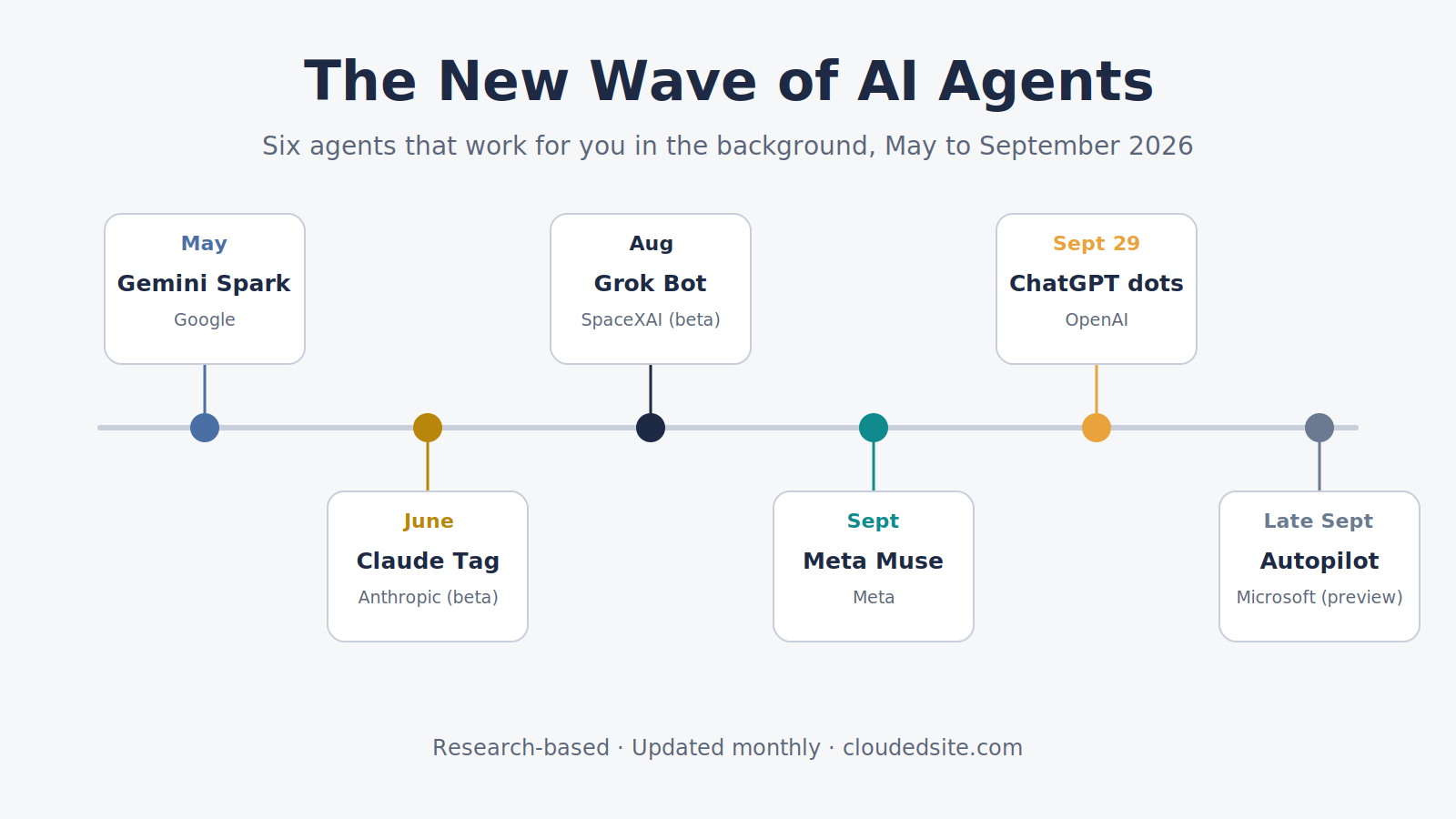
This year I’ve watched something shift. For three years, AI meant a chat window: you asked, it answered. Since May, six of the biggest companies in tech have released, or started previewing, something different: AI agents that work for you in the background, from their own cloud computers, while your laptop is closed.
When I talk with working professionals about AI, the question used to be which chatbot writes the best email. Now it’s which of these should I let act on my behalf, and with what? I don’t think that’s a features question. It’s a question about trust, and about whose account the agent lives in. That’s how this page is organized.
Quick answer:
- For your personal life, the low-cost entry points are Gemini Spark ($19.99/mo, free for a year for US college students), Meta Muse (free), Grok Bot (from $20/mo) and Claude (from $20/mo).
- For your work, look at what your organization already licenses: ChatGPT dots (Business Premium, Edu beta), Claude (Team, Enterprise), Grok Bot (Teams) and, still in preview, Microsoft Autopilot.
- Several are still in beta or preview. Check the status table before you plan around any of them.
What an AI agent is
A chatbot answers. An agent acts: it opens websites, fills in forms, sends messages, and keeps working after you close your laptop. The analogy I find most useful: a chatbot is a reference librarian; an agent is an assistant with a key to your office.
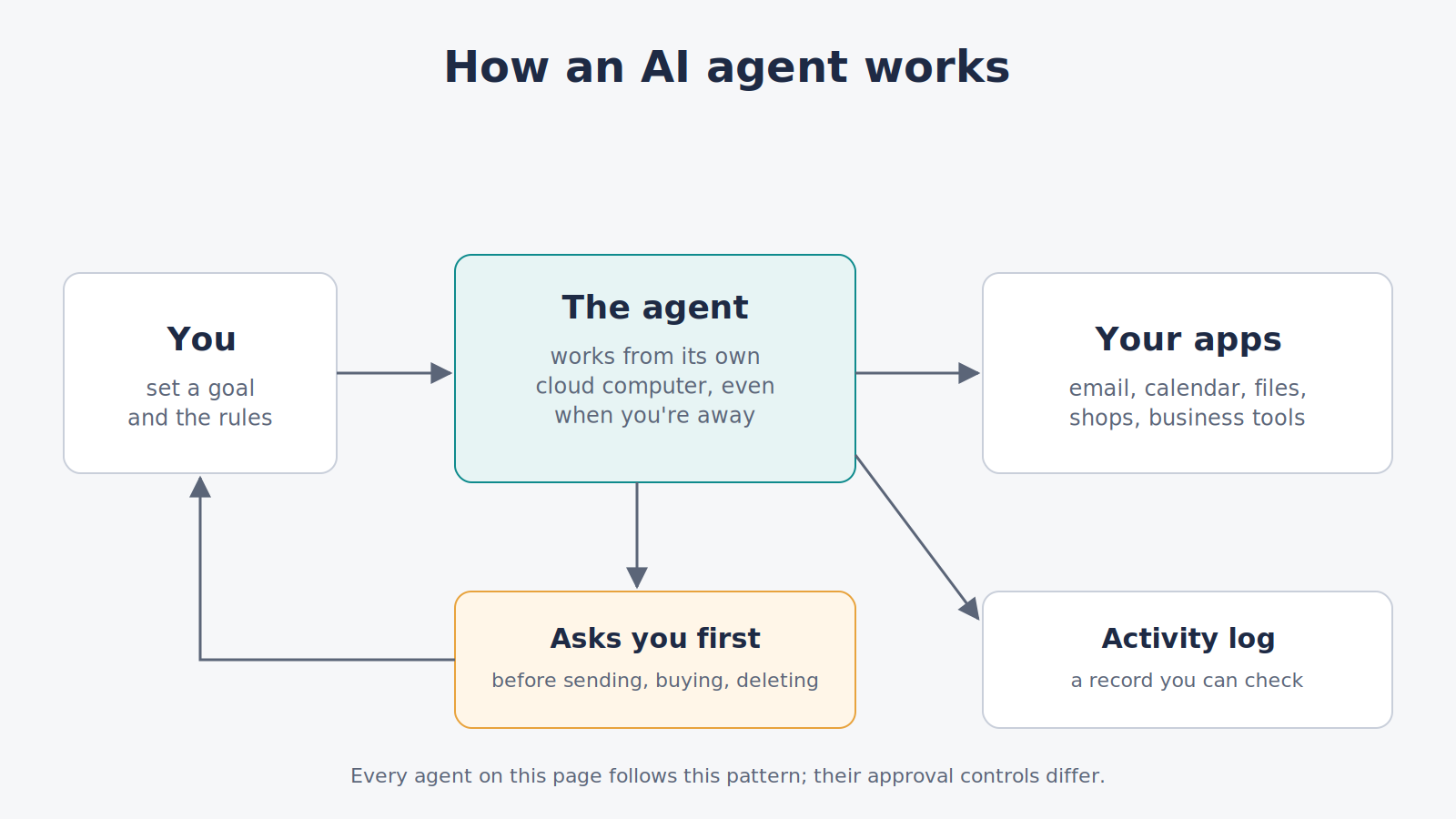
Every agent below follows that pattern. What differs is who holds the key, and that’s the work-versus-personal question.
Work or personal? Start with whose account it is
A personal agent lives in an account you own and pay for. You decide what it connects to, and the data rules are the consumer terms you agreed to.
A work agent lives in an account your organization controls. An administrator decides what it can touch, the organization’s contract governs the data, and in most cases your company or school has rules about which tools may see its information.
That line matters more than any feature. A personal agent connected to your work email may break your employer’s or school’s data rules, even if the agent itself is excellent.
| Personal | Work | |
|---|---|---|
| Gemini Spark | Yes (personal Google accounts) | Not on work or school accounts for now; Google lists early access for select business users |
| Meta Muse | Yes | Small-business version for owners; no admin controls described |
| Grok Bot | Yes (SuperGrok or Cursor Pro and up) | Yes (Cursor Teams; Team Bots beta) |
| Claude | Yes (Pro, Max) | Yes (Team, Enterprise; Claude Tag beta in Slack) |
| ChatGPT dots | Yes (Pro) | Yes (Business Premium; Enterprise and Edu beta) |
| Microsoft Autopilot | No | Preview for Microsoft 365 business customers |
Where each one stands (as of October 1, 2026)
| Agent | Status | Price and access |
|---|---|---|
| Gemini Spark (Google) | Available where Gemini apps are offered, except the EEA, UK, Switzerland and Nigeria | Google AI Pro, $19.99/mo; Ultra $99.99 or $199.99/mo for 5x or 20x Pro’s usage. US college students 18+: AI Pro free for a year (sign up by Dec 31, 2026) |
| Meta Muse | Available, US only | Free for everyday use; Power $20/mo, Maximum $100/mo. A card is required at sign-up. Small-business version free with limits |
| Grok Bot (SpaceXAI) | Beta | Cursor Pro $20/mo, Pro+ $60, Ultra $200, or Cursor Teams ($40 or $120/user). Also SuperGrok (about $30/mo), SuperGrok Plus and SuperGrok Heavy (about $300/mo); grok.com shows SuperGrok prices at checkout. Not on SuperGrok Lite or free plans. Bot usage is separate from your plan’s own usage |
| Claude (Anthropic) | Available; Claude Tag in beta | Pro $20/mo, Max from $100/mo; Team seats $20 or $100/mo (annual); Enterprise $20/seat plus usage. Scheduled tasks on all paid plans |
| ChatGPT dots (OpenAI) | Available on Pro and Business Premium; beta for Enterprise and Edu | One dot included with Pro ($200/mo) or a Business Premium seat ($100/mo annual, $125 monthly). Not on Plus or Free. Pro excludes the EEA, UK and Switzerland |
| Microsoft Autopilot | Private preview, expanding from late September; no general release date | Requires Microsoft 365 Copilot ($30/user/mo, annual) plus pay-as-you-go Copilot Credits. For organizations on Microsoft 365, not consumers |
Prices change quickly; Grok Bot’s entry price fell from $200 to $20 in its first 15 days. Confirm on each company’s site.
The six agents, briefly
Gemini Spark: the agent inside your personal Google account
Google announced Spark at I/O in May. It works across Gmail, Calendar, Drive, Docs and Sheets, has its own email address you can forward jobs to, and keeps running when your devices are off. It confirms before sending messages, changing data, buying or submitting forms. Caveat: personal accounts only, and it requires Google’s Keep Activity setting, which lets Google use your activity to improve its services, including model training.
Meta Muse: the free everyday agent
Launched in the US in September. Each user’s Muse runs on a private virtual machine, and a separate “Sentinel” agent must approve anything it sends to the internet. It asks before sending or buying. Caveat: an Inc. reviewer reported that the Mac app read his private messages without his asking, and Amazon has blocked Muse from shopping on its site.
Grok Bot: named agents that work in parallel
SpaceXAI’s beta gives you Bots that keep memory, work in parallel, and keep going on their own cloud computer; independent guides describe naming each one and giving it a role. It’s now available on plans from $20 a month, so it’s a genuine personal option as well as a team one. Caveats: independent guides report that all of a user’s Bots share one cloud computer, including logins; and Bot usage limits aren’t published in detail, with early users reporting they ran through allowances quickly under heavy use.
Claude: task-based agent work, with a team version in Slack
Claude can take on multi-step jobs (research, documents, files) in its own cloud workspace and keep going after you close the app. Scheduled tasks run remotely on all paid plans, and Claude Tag (beta, Team and Enterprise) works inside Slack channels; with its ambient mode on, it can flag things and follow up on its own. Caveat: Claude is task-based, so you start or schedule the work, rather than one always-on agent watching for things to do.
ChatGPT dots: always-on coworkers
Announced September 29. Dots run continuously from their own cloud computers, connect to thousands of apps, and work in ChatGPT, Slack and Teams. Custom rules let you choose what a dot may do alone, what needs your approval, and what it may never do. Caveat: the cheapest personal route is the $200 Pro plan.
Microsoft Autopilot: the coming agent for Microsoft 365
Formerly called Scout, Autopilot is a persistent agent inside an organization’s Microsoft 365, working through Teams, Outlook and documents. Caveat: it’s in private preview with no general release date, and Microsoft hasn’t said whether education licenses will include it.
Safety controls and your data
| Agent | Before it acts | Your data |
|---|---|---|
| Gemini Spark | Confirms before sending, changing data, buying or submitting forms | Requires Keep Activity on, which allows use for training; some chats are seen by human reviewers |
| Meta Muse | Asks before sending or buying; Sentinel approves internet access; activity log | Opt out under Settings → Data controls → “Help improve our AI models” |
| Grok Bot | Enterprise plans add access, network and audit controls; all of a user’s Bots share one cloud computer | Personal plans: turn off “Improve the model” in Data Controls. Business content isn’t used for training |
| Claude | Each scheduled task has its own approval setting | Pro and Max: your choice under Privacy Settings → “Model Improvement.” Team, Enterprise and Education: not used for training by default |
| ChatGPT dots | Custom rules (allow, approve, block); an auto-review step double-checks sensitive actions; password changes always need you | Pro: your choice. Business Premium: not used for training |
| Microsoft Autopilot | Agent 365 permissions and audit records; no full approval policy published yet | Stays within your organization’s Microsoft 365 environment |
What it looks like in practice
These are illustrative, built from features the companies have described, not test results.
At work: the weekly brief. A department chair or team lead asks an agent to read the week’s shared channel, project folder and calendar, then draft a Monday summary of deadlines, open questions and who’s waiting on whom. That fits a dot in Teams or Slack, a Claude scheduled task, Claude Tag in Slack, or a shared Grok Team Bot, and eventually Autopilot. A person still checks the summary before it’s sent, and the organization decides which folders the agent may read.
At home: the inbox and subscription cleanup. You forward a messy month of email to Gemini Spark, or connect statements to Muse, and ask: “List what I haven’t answered, and every recurring charge. Don’t cancel anything yet.” You still check each cancellation and each reply.
A note for education. US college students have the best deal right now: a free year of Google AI Pro, Spark included, on a personal account (18+). Students outside the US get Google AI Plus instead, which doesn’t include Spark. Faculty and staff should treat agents as work tools, and use only what the institution licenses and approves. Don’t connect systems covered by FERPA or your institution’s data rules to a personal agent, and don’t forward work email to a personal account to get around that.
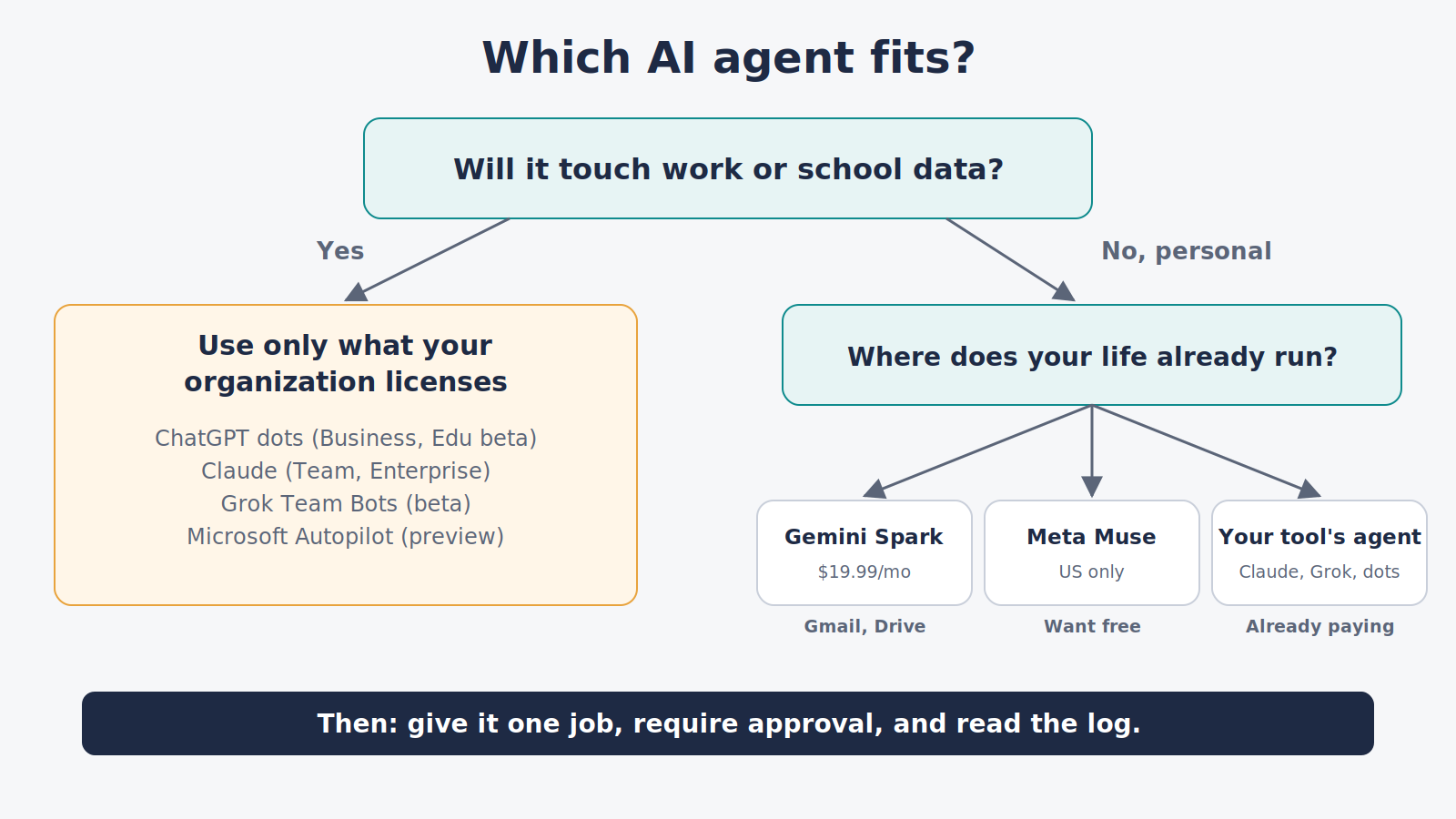
Five questions to ask any agent before you connect it
- Whose account does it live in, yours or your organization’s?
- Does it ask before sending, buying or deleting? Can you make that the rule?
- Can you see a log of everything it did?
- Is your data used for training, and can you switch that off?
- Who pays if it makes a costly mistake? Read the written terms, not the launch post.
My rule of thumb: treat an agent like a new hire on day one. Give it one job, watch how it does it, and widen its access only as it earns your trust.
What to watch next
- Microsoft Autopilot leaving preview, and whether education licenses include it.
- ChatGPT dots reaching cheaper plans; OpenAI has said wider availability may come later.
- Gemini Spark on Workspace work and school accounts; Google hasn’t announced a timeline.
- Grok Bot pricing and allowances, which have changed several times since August.
Quick self-check
- What’s the first question to ask about any agent? Whose account it lives in, yours or your organization’s.
- Can a professor use Gemini Spark with a university Google account? No. Spark works only with personal accounts.
- What’s the cheapest way to try Grok Bot? Cursor Pro at $20 a month, or SuperGrok at about $30.
Change log
| Date | Change |
|---|---|
| October 1, 2026 | Page created: Gemini Spark, Meta Muse, Grok Bot, Claude, ChatGPT dots, Microsoft Autopilot |
About the author: J. Bond teaches university courses on AI and automation, and also teaches continuing education courses in AI for business and education. This page is research-based: it draws on the companies’ announcements, help pages and independent reporting, listed below. No company paid for placement, and this page contains no affiliate links. How we research
Related: What Are AI Agents? · Gemini Review · Best AI Agents for Professionals
Sources
Gemini Spark – Google: Gemini Spark overview – Google Gemini Help: Use Gemini Spark – Google: Google AI Pro and Ultra plans – Google Gemini Help: Keep Activity and privacy – AI Agents Library: Spark account requirements – MacRumors: Free year of Google AI Pro for college students (Aug 19, 2026) – TechCrunch: Google introduces Gemini Spark (May 19, 2026)
Meta Muse – Meta Newsroom: Introducing Muse – TechCrunch: Muse for Small Business (Sept 29, 2026) – Engadget: How to get started with Muse – DataCamp: Meta Muse pricing – Inc.: Muse and private messages – SiliconANGLE: Amazon blocks Muse (Sept 21, 2026)
Grok Bot – SpaceXAI: Introducing Grok Bot (Aug 11, 2026) – SpaceXAI: Grok Bot is now included with more plans (Aug 26, 2026) – SpaceXAI: Team Bots (Sept 28, 2026) – Grok: SuperGrok plans (Grok Bot listed as a SuperGrok feature) – Cursor: Pricing · Cursor docs: plan prices – AI Toolbox: Grok plan prices, from xAI’s pages (updated Sept 15, 2026) – CellCog: Grok Bot on Cursor Pro, price history – SpaceXAI: FAQ (training and opt-out) – Codersera: Grok Bot guide (shared cloud computer)
Claude – Anthropic: Claude pricing – Claude Help Center: Schedule recurring tasks – Anthropic Privacy Center: Is my data used for model training? – TechRepublic: Anthropic launches Claude Tag (June 2026)
ChatGPT dots – OpenAI: Introducing dots (Sept 29, 2026) – OpenAI Help: Manage dots in ChatGPT workspaces – OpenAI Help: What is ChatGPT Business – IntuitionLabs: ChatGPT plans compared – dotsguide: Dots pricing and availability – BetaNews: OpenAI launches dots (regions)
Microsoft Autopilot – VentureBeat: Microsoft’s persistent Autopilot agent (Sept 2026) – Microsoft: Copilot in Education